
Assembly has a reputation for being hard. I do not think the language is the
problem. There are only a few dozen instructions you actually need, and each
one does something small and clear. mov copies, add adds, jmp jumps.
The problem is that you cannot see anything.
Four windows for one line
Here is what learning assembly usually looks like. You write a file in your
editor. You switch to a terminal and run nasm. Then ld. Then you run the
program, and it either prints nothing or crashes with a segfault. So you open
gdb, type layout regs, set a breakpoint, type stepi and stare at a wall of
hex trying to remember which register was supposed to hold what.
Then you change one line and do all of it again.
None of that is assembly. It is tooling. But for a beginner it all feels like the same wall, and a lot of people quit before they get to the part where it clicks.
What makes it click
Assembly clicks when you watch it run. You step over add rax, rbx, and you
see rax change. You step over cmp, and you see the zero flag light up. You
push, and the stack grows by eight bytes right in front of you. After a few
of those, the instructions stop being magic words and start being what they
are: small changes to a small amount of state.
So the tool I wanted was simple: my code on one side, that state on the other, and one key to move forward.
ratasm
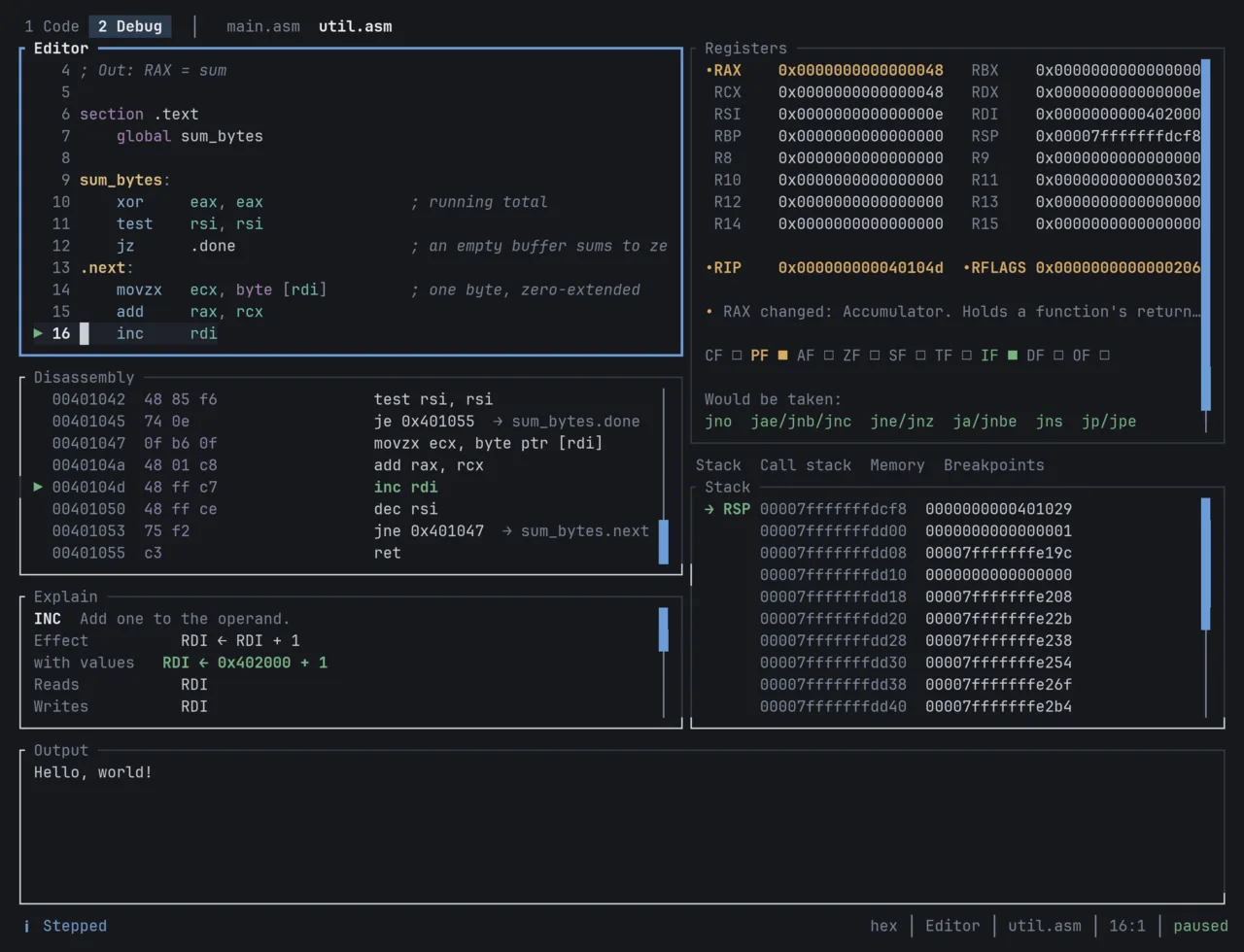
ratasm is a terminal IDE for x86-64 assembly. You write, build, run and debug in one window. F6 builds, F5 runs, F12 starts debugging, and F7 steps one instruction while the registers, flags and stack update beside your source.
cargo install ratasm
ratasm new hello
cd hello
ratasm
It still uses the real tools underneath: nasm, ld and gdb. ratasm does
not hide them. It just puts them in one place, so you can stop juggling windows
and look at what your program is doing.
There are also a few lessons behind F1, with questions that are checked by running your answer on the processor. If you have been meaning to learn assembly and kept bouncing off the setup, give it a try.